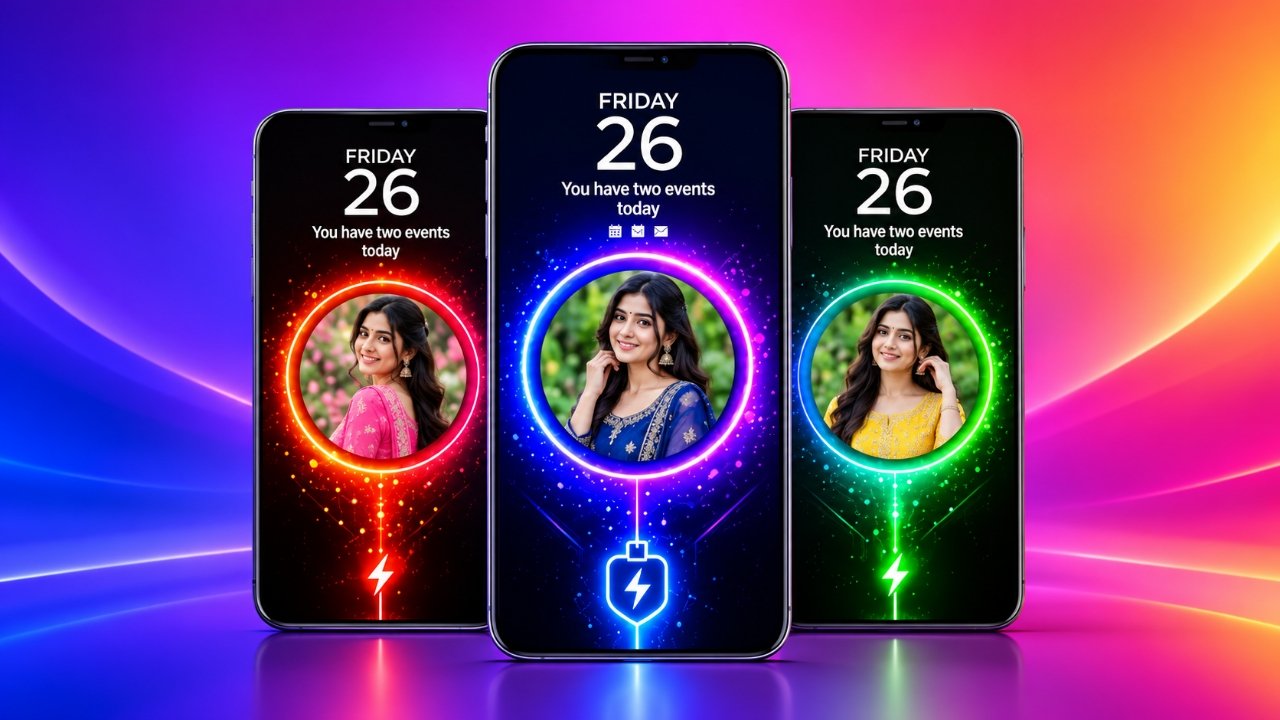
Smartphones have become an important part of everyday life, and personalizing their appearance is a fun way to make them feel more unique. From custom wallpapers to redesigned app icons, Android offers plenty of ways to create a look that reflects your personality. However, one screen that often receives little attention is the charging display.
Batix – Charging Photo is an Android customization app that brings a fresh approach to this feature. It allows users to display personal photographs, explore animated charging themes, and add colorful visual effects whenever their phone is connected to a power source.
For anyone who enjoys experimenting with smartphone customization, Batix offers an interesting way to make the charging experience more visually appealing.
Also Read: Licowa AI Photo Editor: How to Edit Photos, Create Collages, and Make Live Wallpapers
What Makes Batix – Charging Photo Interesting?
Most Android phones use a basic charging interface that displays battery information without offering many visual customization options. Batix aims to change that by introducing personalized backgrounds and decorative charging animations.
Rather than relying on the standard charging appearance, users can select their preferred pictures and combine them with different visual styles.
The app brings together photo-based customization, animated effects, and battery-related information in one place. This makes it an option worth exploring for people who enjoy giving their smartphones a distinctive appearance.
Explore the Main Features
Batix includes several customization options designed to transform the way your phone looks while charging. Here are some of the features highlighted by the app.
1. Use Your Favorite Photos
One of the most appealing aspects of Batix is the ability to personalize the charging display with pictures from your phone’s gallery.
Instead of seeing the same default charging interface every time, you can choose an image that has personal meaning or simply matches your preferred style.
Some photo ideas include:
- Pictures of friends and family
- Favorite travel photographs
- Personal portraits and selfies
- Pictures of pets
- Beautiful landscapes and nature scenes
- Creative wallpapers and artwork
Once selected, your chosen photograph can become the background of your customized charging screen.
2. A Collection of Attractive Charging Themes
If you prefer ready-made designs over personal photographs, Batix also offers different charging theme styles.
These designs can help you change the appearance of your charging screen without modifying your phone’s launcher or home screen.
Depending on the available collection, you may find options such as:
- Futuristic technology-inspired designs
- Colorful RGB-style visuals
- Neon-inspired themes
- Abstract animated backgrounds
- Simple and minimal designs
- Modern decorative effects
Having different styles available makes it easier to experiment with the appearance of your charging display.
3. Eye-Catching Charging Animations
A static charging screen may look ordinary, but animated effects can make it more interesting.
Batix introduces visual animations that appear when a compatible device starts charging. These effects provide an alternative to the basic charging indicators commonly found on Android smartphones.
Users can explore the available animation styles and select an appearance that suits their preferences.
4. Battery Information at a Glance
Apart from visual customization, the app also focuses on displaying charging-related details.
Depending on the features supported by your device, the charging display may include information such as:
- Current battery percentage
- Charging status
- Battery level progress
- Updated battery information
- Other available charging indicators
This can make it easier to check basic battery information while enjoying a customized screen.
5. Easy Customization for Beginners
You don’t necessarily need advanced Android knowledge to personalize your charging display.
Batix is designed around a straightforward customization process. Users can explore the available designs, select an image, and choose their preferred animation through the app’s interface.
This makes it accessible to people who are new to smartphone personalization.
How to Set Up Batix on Your Android Phone
Getting started with Batix is relatively simple. After installing the application, follow these general steps to customize your charging screen:
- Open the app after installation.
- Explore the available charging themes and designs.
- Select a photograph from your gallery if you want a personalized background.
- Choose an animation style that matches your preference.
- Enable the charging screen feature using the available settings.
- Connect your phone to a charger to check the customized display.
Once the setup is complete, the selected charging design should appear when your phone is connected to power, provided your device supports the required functionality.
The available settings and setup options may differ depending on your Android version and smartphone model.
Why Consider Using Batix – Charging Photo?
There are several reasons why Android users interested in personalization might want to explore this application.
A More Personal Charging Experience: Using your own photographs gives the charging display a personal touch. You can choose images that remind you of special moments or simply match your taste.
Fresh Visual Appearance: Animated effects and decorative themes offer an alternative to the standard charging interface.
Multiple Design Choices: Different visual styles make it possible to change the charging screen whenever you want something new.
Convenient Customization: The app brings photo selection and charging screen personalization together, making the process easier to manage.
No Need to Redesign Your Home Screen: Charging screen customization provides another way to personalize your device without changing its existing launcher or icon arrangement.
Is Batix Suitable for Every Android User?
Batix may appeal to different types of Android users, particularly those who enjoy changing the appearance of their devices.
It could be worth exploring if you:
- Enjoy customizing your smartphone’s interface.
- Prefer personal photographs over standard backgrounds.
- Like animated charging effects.
- Want to experiment with neon-inspired designs.
- Enjoy trying different themes and visual styles.
- Want a more personalized charging display.
However, users who prefer a completely simple smartphone interface may not find animated charging screens particularly necessary.
Installing the App Safely
If you want to try Batix – Charging Photo, look for the application through the Google Play Store or another trusted distribution source.
Before installing it, consider taking a few basic precautions:
- Check the developer’s information to confirm that you have found the intended application.
- Read recent user reviews for feedback about performance and usability.
- Review the requested permissions before granting access.
- Allow photo or media access only when needed for selecting personal images.
- Check the privacy policy to understand how your information is handled.
- Keep the application updated when new versions become available.
Remember that granting unnecessary permissions is best avoided. You should also review the app’s compatibility with your Android device before relying on its features.
Performance and Compatibility Considerations
Although Batix is designed to provide a visually customized charging experience, its performance may not be identical across all smartphones.
Factors such as Android version, device specifications, available memory, and background activity can influence how charging animations behave.
Some devices may also apply their own battery management restrictions, which can affect how third-party charging screen applications operate.
For the best experience, check the app’s compatibility information and follow the setup instructions provided by its developer.
Also Read: Mico 4K Live Wallpaper Creator & Smart Lock Screen Widgets Review 2026
Official Play Store Link
Final Thoughts
Batix – Charging Photo offers an alternative way to personalize an often-overlooked part of the Android interface. Its combination of custom photo backgrounds, decorative themes, and animated charging effects makes it an interesting choice for people who enjoy experimenting with their smartphone’s appearance.
The ability to use personal pictures is particularly appealing because it allows users to create a charging display that feels more individual rather than relying entirely on pre-designed themes.
While the overall experience may depend on device compatibility and the features available in the installed version, Batix is worth considering if you enjoy visual customization and want something different from the standard Android charging screen.
Overall, Batix – Charging Photo is an interesting personalization option for Android users who want to bring their favorite pictures and creative animations to their phone’s charging display.